






What's so special about the X-Box?
X-Box FAQ Frequently Asked Questions
Flashing the TSOP of your Xbox Tutorial
X-Box UXE Softmod Installation tutorial
Flash the Firmware of your Xbox 360
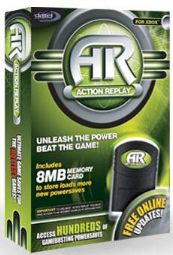
| This is what the Action Replay box looks like, it sells for around $40 and comes with its own 8Mb Memory card, you should use a genuine Microsoft Memory card to avoid problems. it comes with a USB Memory writer. |
 |
This is what the contents of the Gameshark box look like, it sells for around $30 and comes with no Memory card. You should use a genuine Microsoft Memory card to avoid problems. it comes with a USB Memory writer. |
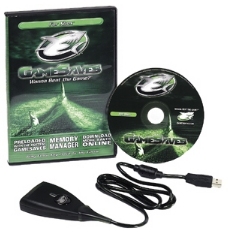 |
Both USB Memory Writers will work fine as the writers are actually just USB cables with a connection to the Memory card. No electronics are used in the writers, so both work with the Action Replay software which is what we will be using to write our save games to the Memory Card (note other Memory cards may work but the Microsoft memory card is 100% compatible).
How to get the save game onto our Memory card
So if you don't have the software you can download the Action Replay software Here after installing it you only need to simply drag the file from the File Explorer window onto the left most pane (which is the contents of the Memory card).
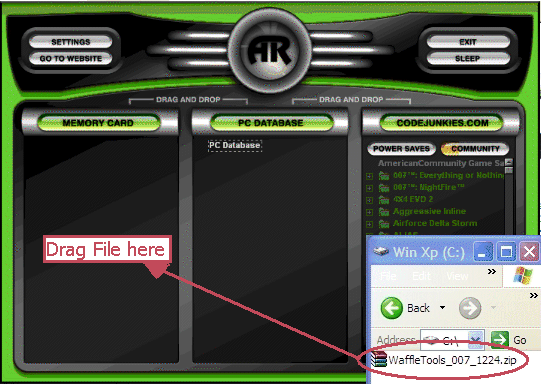
Note in the photo above the large 'AR' is black, it will turn green once a Memory card is inserted and recognized by the Action Replay driver.
Note: If when you insert the memory card you are asked for a driver simply send the add new hardware wizard to this directory to obtain the drivers files needed
C:\Program Files\Datel\ActionReplay Xbox\Drivers
The bar on the Memory Card will turn orange and increase in length until the complete file has been written to the Memory card. The Memory Card screen will be updated with the save games installed on the Memory card. Now you're ready to copy the save game to your Xbox.
You should of course make sure no other save games are present for this game first before copying the new save over!
Copy the save game to the unmodded Xbox that you are about to flash. Make sure you have copied it the hard-drive and do not try loading the save game from the memory card as it will fail and may result in a bad Copy which means your not gonna be playing any games without some major soldering.
If using the 'Splinter Cell' exploit you will need to repeat the above process twice as it actually has two game saves to install (the save game was to large to fit on the memory card so it was split into two parts).
I had never used a memory ca large to fit on the memory card so it was split into two parts).
I had never used a memory card before and couldn't get the copy option to show up until I figured out you need to select the game title first then press the D-pad to the right to enter the folder, now the copy option shows up.