







What's so special about the X-Box?
X-Box FAQ Frequently Asked Questions
Flashing the TSOP of your Xbox Tutorial
X-Box UXE Softmod Installation tutorial
Flash the Firmware of your Xbox 360
How to replace the Power supply or fix a burnt Fuse
First you must open your Xbox to access the PSU (Power Supply Unit)
If you require instructions on how to open your Xbox click Here
To remove your PSU simply remove these two screws (near red arrows in photo below)
First you must open your Xbox to access the PSU (Power Supply Unit)
If you require instructions on how to open your Xbox click Here
There are two different Power supply Units available make sure if obtaining a replacement you match the motherboard connector to your box
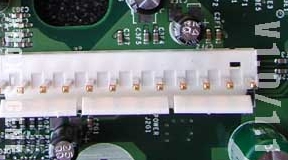 |
Version 1.0/1.1 Xbox's use this connector | |
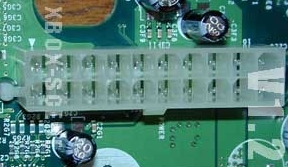 |
Version 1.2 to 1.6 Xbox's use this connector |
To remove your PSU simply remove these two screws (near red arrows in photo below)
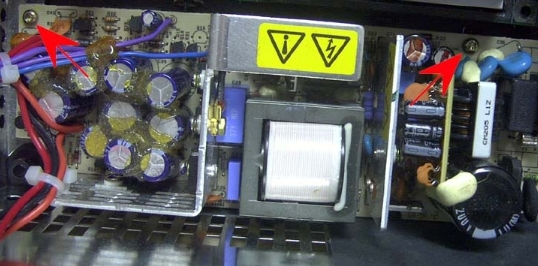
Warning!
The power supply contains capacitors which hold a charge even when the power cable is unplugged use caution when working with the PSU to avoid a shock!
- Disconnect the PSU main power connector from the motherboard by gripping it firmly and pulling upwards, if it won't budge you may need to use a pair of pliers to help you out.
- Carefully grab the loose power cables and lift the PSU out of the Xbox while pulling upwards push through the power cable port to help release the PSU
- If replacing the power supply reverse the process with the new PSU and your done. If you wish to replace the fuse continue to step 4.
- flip the PSU over and find the area that looks like the photo below
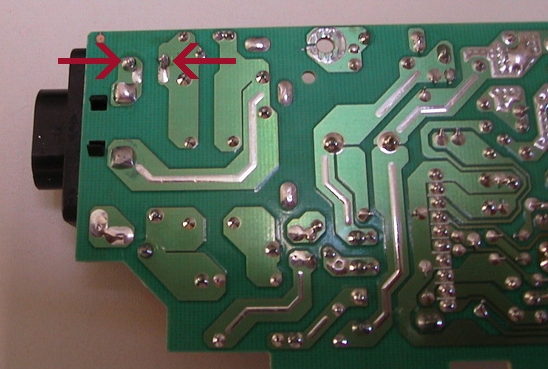
- Carefully unsolder the fuse at the points indicated above. You may need to cut it away from some insulating white goop on the other side first.
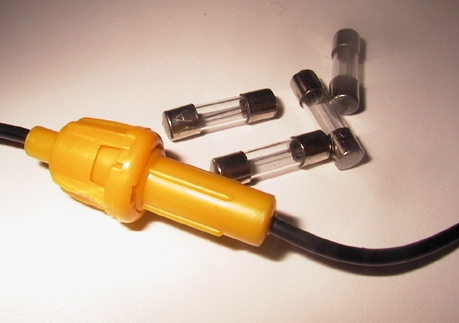
- Purchase a simple fuse holder such as the one in the photo below these can obtained an almost any Automotive parts store or hobby shop. Also remember to pick up some spare 5 amp fuses that fit your fuse holder assembly.
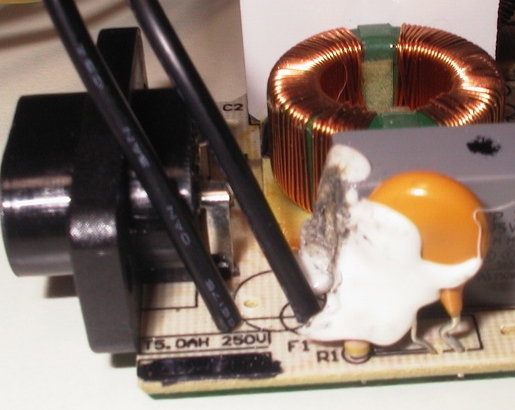
- Now you simply have to solder the two ends of the fuse holder to the PSU circuit board by sticking the ends of the wire through the holes where the old fuse used to attach. the finished assembly should look like the photo below.

All of the pictures and information contained within the www.biline.ca website are the property of Jeff Mathurin please do NOT use any of the contents of this website without consent. If you would like to contact me for any reason then feel free to use the contact form by clicking Here